WhatsApp Coexistence API
In 2025, Meta introduced one of the most important updates to the WhatsApp ecosystem:
The WhatsApp Coexistence API.
This update completely changes how businesses use WhatsApp for automation, broadcasting,
and CRM integration — without losing access on their own phones.
1. What Is Meta’s WhatsApp Coexistence API?
The Coexistence API allows your WhatsApp Business number to be used in two ways at the same time:
- ✔ Use WhatsApp normally on your phone (no logout, no restrictions)
- ✔ Use API functions (broadcasting) on the same number
This is a major improvement because before 2025:
❌ Old Business Solution Provider (BSP) Method
- Your WhatsApp would be logged out from your phone.
- You could only access WhatsApp through the BSP system.
- You lost the ability to use the WhatsApp mobile app.
- Switching back required a painful migration.
✔ New 2025 Coexistence
- You keep your WhatsApp on your phone.
- You can use API features at the same time.
- No migration, no forced logout, no BSP lock-in.
2. Why This Is a Game Changer (Real-World Benefits)
Benefit 1 — Use WhatsApp Normally on Your Phone
You can chat with customers manually like normal — with no interruptions. Your customers still see the same WhatsApp number.
Benefit 2 — Broadcast Anytime Using API
Your phone handles daily chats, while your system handles broadcasts.
- Agent replies to customers on the phone
- Broadcast to 1,000–10,000 contacts using API
- No logout required
- Official Meta solution
Benefit 3 — Official Meta Solution
- Not Selenium
- Not WhatsApp Web automation
- Not unofficial API
Fully supported by Meta for CRM, SaaS platforms, automation and business integrations.
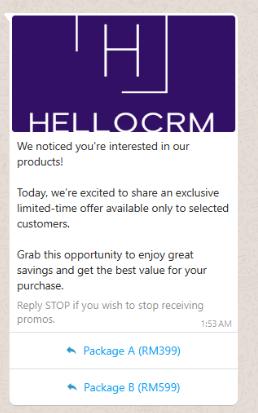
Benefit 4 — Send Template Messages with Buttons
- Button templates
- Call-to-action templates
- Quick reply templates
- Image templates
3. Downsides
❌ Template Messages Cost Money
Meta charges per outbound template message.
- Cost depends on country
- Marketing templates cost more
- Utility templates cost less
💡 How Is a Template Categorized? (Utility vs Marketing)
You do not pick the category — Meta auto-categorizes it based on the message content. When you submit a template for approval, Meta reads the text and decides which category it belongs to. This is why the same template can be cheap or expensive depending on what it says.
| Category | What the message looks like | Example |
|---|---|---|
| Utility Cheaper |
Transactional, account, order, booking, delivery, reminder, receipt, OTP follow-up. The customer expects this message. | "Hi Ali, your order #A123 has been shipped. Tracking: ABC-456." |
| Marketing More expensive |
Promotions, discounts, sales, new product launches, re-engagement, upselling. Anything that tries to drive a sale. | "Hi Ali, 50% off this weekend only! Shop now at..." |
| Authentication OTP only |
One-time passwords and verification codes only. | "Your login code is 482193. Do not share." |
Important things to know
- Meta may reclassify your template after submission — if you write a mixed message (e.g. "Your order shipped 🚚 — and here's 20% off next time!"), Meta will likely treat it as Marketing and charge the higher rate.
- Keep utility messages pure. Do not add promotional text inside transactional messages if you want the cheaper rate.
- You will see the final category in your template approval status before you start broadcasting.
❌ Must Follow Meta Policy
- Consent rules
- Quality rating rules
- Template approval rules
4. Biggest Advantage vs Cloud API
✨ Lower Risk When Broadcasting
- No forced logout
- Use same WhatsApp number
- Lower risk vs web automation
- No BSP lock-in
5. Summary
| Feature | Description |
|---|---|
| Phone stays logged in | Continue using WhatsApp normally |
| API available | Broadcast & automation |
| Template messages | Buttons supported |
| Cost | Meta charges per template conversation |
| Policy | Must follow Meta rules |
| Advantage | Lower risk vs web automation |
6. Pricing (Estimated in RM)
A. System Fee
| Setup Fee | RM XXX (We are free on setup fee) |
| Monthly System Fee | RM XXX / month |
| Broadcast Module | Included |
| CRM Integration | Included |
B. Meta Message Fee
Meta charges mainly for template messages.
| Message Type | Estimated Price (Malaysia) | Charged? |
|---|---|---|
| Marketing Template | RM0.40 per message | Yes |
| Utility Template (outside 24h window) | RM0.06 per message | Yes |
| Utility Message (within 24h window) | FREE | No charge |
| Normal reply message | FREE | No charge |
| Customer sends message to you | FREE | No charge |
What is 24-hour window?
When a customer sends you a WhatsApp message, a 24-hour customer service window opens.
Within this 24 hours:
- You can reply freely
- You can send utility messages
- No Meta charge
After 24 hours:
- You must send template message
- Meta will charge per template message
Example
Send broadcast to 1,000 customers:
1,000 x RM0.06 = RM60
7. Example Monthly Cost
| Usage | Estimated Cost |
|---|---|
| System monthly fee | RM100 |
| 2,000 utility messages | RM120 |
| Total | RM220/month |
8. Who Should Use This
- Businesses sending promotions
- Property agents
- Car dealers
- Ecommerce
- CRM users
- Companies sending reminders
9. FAQ
Can I still use WhatsApp on phone?
Yes. Phone works normally.
Will my number get banned?
Low risk if follow Meta policy.
Can send bulk messages?
Yes using approved templates.
Can send images and buttons?
Yes.
Is this better than WhatsApp Web automation?
Yes because this is official Meta API.
Do I need Meta verification?
Usually yes for business usage.